
Humans are wired for creativity, driven by a desire to explore, build, and connect. We all seek work that gives us purpose—whether that’s launching a business, creating content that inspires, building relationships with clients, or crafting solutions that help others thrive. Yet too often, our workdays are weighed down by repetitive tasks that drain our energy and stifle our creativity. To truly reconnect with the purpose of our work, we need more than just efficiency; we need a completely new approach.
We believe the answer lies in AI, embodied in Microsoft 365’s Copilot.
So, what exactly is Copilot? How does it differ from other tools? How can you start using it, and—most importantly—how can it directly enhance your work experience?

 What is Microsoft Copilot?
Microsoft Copilot is an innovative, AI-powered tool integrated into Microsoft 365 to help you work smarter, not harder. By tapping into advanced machine learning and natural language processing, it’s designed to boost creativity, streamline productivity, and enhance collaboration.
Think of it as a highly intuitive digital assistant that doesn’t just execute commands but adapts to how you work. Copilot intuitively “learns” how you interact with Microsoft apps, enabling you to unlock more of the features and functionalities that may have previously gone unnoticed.
In technical terms, Copilot is powered by deep learning and data analysis, coupled with a sophisticated connection to Microsoft Graph—a knowledge network that spans the entire Microsoft suite, capturing information from emails, chats, meetings, and documents. This vast data network allows Copilot to draw insights and generate content that reflects your specific work environment, making each interaction more meaningful and contextually relevant.
“68% of users feel that Copilot has improved the quality of their work and saved more than 10 hours per month”
Why is Copilot the Best Option for Business?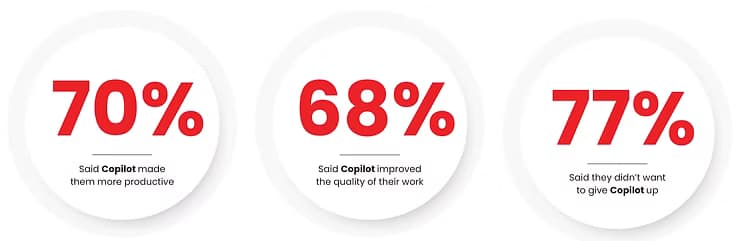 How Can Microsoft 365 Copilot Directly Benefit You?
 Each of these features gives you an idea of Copilot’s capabilities, yet it’s only the beginning. As Microsoft continues to innovate, Copilot will evolve to offer even more ways to enhance your daily work.
How will Copilot fit in your industry? Microsoft 365 Copilot isn’t just for one type of business—it’s adaptable across industries and functions. Here are some examples of how various industries can personally benefit:
Human Resources
Speed up hiring by generating job descriptions in Word, summarising candidate profiles, and extracting key skills from resumes.

Marketing
Leverage Copilot in Excel for market analysis and use Word to draft promotional content or PowerPoint for compelling pitch decks

Customer Service
Streamline support with Copilot in Outlook to draft replies and summarise customer inquiries. Use Excel to analyse feedback trends and improve service.

Management
From tracking performance metrics in Excel to creating insightful reports in Word, Copilot supports informed decision-making across departments.
 Ready to explore more about Copilot?
Empower your team to make a real impact, build trust, and drive lasting success from the ground up.